
If your Telegram bot suddenly stops responding while using polling, you’re not alone. This is one of the most common issues developers face when building bots for the first time.
You might notice errors like:
Conflict: terminated by other getUpdates request- Bot starts but doesn’t reply
- Polling runs forever with no updates
The good news? In most cases, the fix is simple.
In this guide, we’ll walk through the real reasons why a Telegram bot gets stuck on polling — and how to fix each one with practical examples.
What Does “Polling Mode” Mean?
When your bot uses polling, it keeps asking Telegram servers for new messages using the getUpdates method.
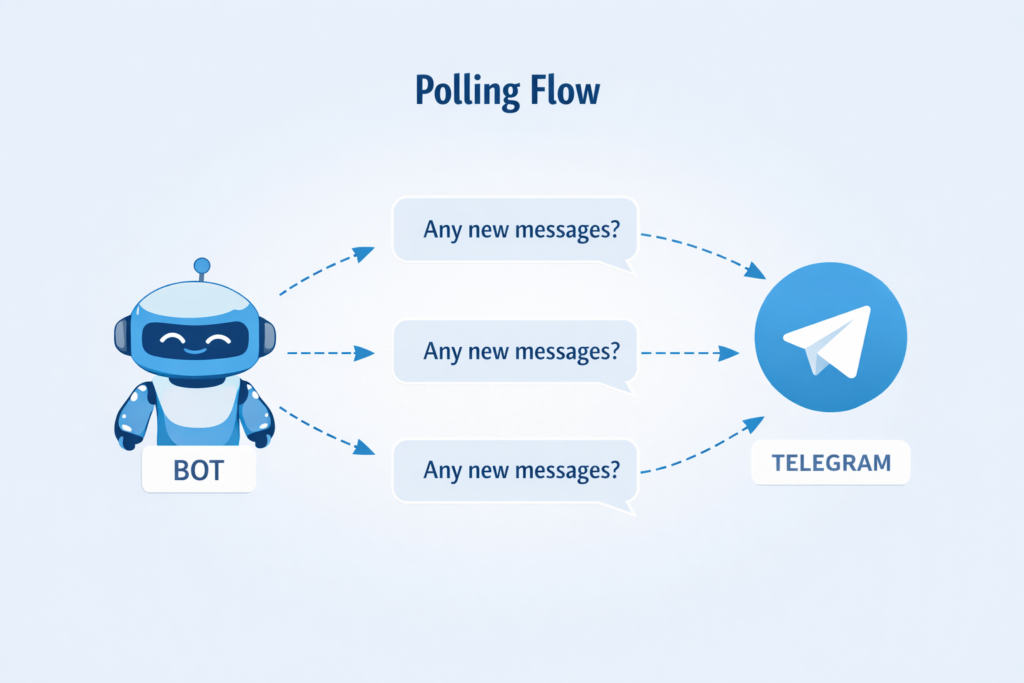
Polling is great for development and small bots because it’s easy to set up. But it can also run into conflicts if not configured properly.
Common Reasons Your Bot Gets Stuck on Polling
Let’s look at the real-world causes.
1. Multiple Bot Instances Running
This is the number one reason.
Telegram allows only one active polling connection per bot token. If you accidentally run your bot twice, Telegram will terminate one of them and show:
Conflict: terminated by other getUpdates requestWhat usually causes this:
- Running the script twice
- Bot still running in background
- Server process not stopped properly
2. Webhook Is Still Enabled
Polling and webhook cannot work at the same time.
If a webhook is already set for your bot, polling will silently fail or behave unpredictably.
Many developers forget this after switching from webhook back to polling.
3. Bot Didn’t Shut Down Cleanly
If your bot crashes or you force-close the terminal, the previous polling session may still appear active for a short time.
This can cause temporary conflicts when restarting.
4. Blocking Code Inside Handlers
Long synchronous operations (like heavy loops or time.sleep) can freeze the polling loop.
This makes the bot appear stuck even though it is technically running.
5. Network or Timeout Problems
Unstable internet or very short timeouts can also interrupt polling.
This is less common but still worth checking.
Step-by-Step Fixes
Let’s go through the solutions that actually work in practice.
Fix #1 — Make Sure Only One Bot Instance Is Running
Before changing any code, check whether your bot is already running somewhere.
On Windows
taskkill /F /IM python.exeOn Linux / macOS
pkill -f bot.pyThen start your bot again.
In many cases, this alone fixes the issue.
Fix #2 — Remove Any Existing Webhook (Very Important)
If you previously experimented with webhooks, this step is critical.
Step 1: Check webhook status
Open in browser:
https://api.telegram.org/bot<YOUR_TOKEN>/getWebhookInfoIf you see a non-empty "url", Your webhook is still active.
Step 2: Delete the webhook
Open:
https://api.telegram.org/bot<YOUR_TOKEN>/deleteWebhookExpected response:
{"ok":true,"result":true}Now restart your bot.
Fix #3 — Use Proper Polling Code
Here is a clean example using python-telegram-bot.
from telegram import Update
from telegram.ext import ApplicationBuilder, CommandHandler, ContextTypes

async def start(update: Update, context: ContextTypes.DEFAULT_TYPE):
    await update.message.reply_text("Bot is working!")

app = ApplicationBuilder().token("YOUR_TOKEN").build()
app.add_handler(CommandHandler("start", start))

app.run_polling()
If your setup was correct, the bot should now respond to /start.
Fix #4 — Avoid Blocking the Event Loop
One subtle mistake is using blocking calls.
❌ Problematic code
import time
time.sleep(60)This freezes polling.
✅ Correct async approach
import asyncio

await asyncio.sleep(60)If your bot feels “stuck”, check for blocking code first.
Fix #5 — Add a Polling Timeout
Adding a timeout improves stability, especially on slow networks.
app.run_polling(timeout=30)This prevents the bot from hanging indefinitely.
Quick Debug Checklist
Before you panic, verify these:
- Bot token is correct
- Only one instance is running
- Webhook has been deleted
- Internet connection is stable
- No blocking code in handlers
- Library is up to date
When Should You Stop Using Polling?
Polling is perfectly fine for:
- local development
- small bots
- testing phase
But consider switching to webhook when:
- your bot grows
- you deploy to production
- you need faster updates
FAQ:
1. Why does Telegram say “terminated by other getUpdates request”?
Because another process is already polling with the same bot token. Stop the duplicate instance and restart.
2. Can polling and webhook run together?
No. Telegram supports only one update delivery method at a time.
3. My bot runs but doesn’t reply. What should I check first?
Start with:
- Webhook status
- Duplicate bot processes
- Blocking code
These three solve most cases.
4. Is polling unreliable?
Not really — it’s just less scalable than webhooks. For development and small bots, it works perfectly fine.
Also Read: